
Train

Workouts and logging Sets, reps, rest timer and your history
Adaptive training Loads suggested from your last sessions
Roadmap Your training phases mapped out months ahead
Exercise library Demos and cues for every movement
Personal records Every PB with an estimated 1RM
Form checks BetaSend a set for video review

Eat

Adaptive nutrition NewTargets that follow your weight trend
AI food photos Snap a meal, get a logged estimate
Food logging Search, barcode and saved meals
Meal plans and swaps Every meal mapped, swaps sized to fit
Recipes Macros worked out per serving
Supplement stack Dose, timing and reorder links

Track

Weekly check-ins Answers, photos and progress in one send
Daily check-in and habits Weight, steps and habits in a minute
Progress and body Weight, measurements and photos charted
Wearables and health sync BetaSteps, sleep and heart rate pulled in
Cycle tracking Periods and symptoms, shared by choice
Bloodwork and labs Lab results organised by marker

Learn and connect

Verify NewFact-check fitness claims with real studies
Courses NewIncluded with every plan, more with each tier
Content library BetaGuides, lessons and resources in one place
Challenges Group programs with set dates
Community Train alongside other members
Coach messages and calls Chat, voice notes and appointments

Your app

Works offline Everything saves on your phone first
Calendar Workouts, check-ins and appointments
Security and privacy Two-factor sign-in, private health data
Install in 3 taps A home-screen app, no app store needed
Beta testers get every feature first. Public release is rolling out.See pricing
Log inStart 3-day trial

Features

Train

Workouts and logging Sets, reps, rest timer and your history
Adaptive training Loads suggested from your last sessions
Roadmap Your training phases mapped out months ahead
Exercise library Demos and cues for every movement
Personal records Every PB with an estimated 1RM
Form checks BetaSend a set for video review

Eat

Adaptive nutrition NewTargets that follow your weight trend
AI food photos Snap a meal, get a logged estimate
Food logging Search, barcode and saved meals
Meal plans and swaps Every meal mapped, swaps sized to fit
Recipes Macros worked out per serving
Supplement stack Dose, timing and reorder links

Track

Weekly check-ins Answers, photos and progress in one send
Daily check-in and habits Weight, steps and habits in a minute
Progress and body Weight, measurements and photos charted
Wearables and health sync BetaSteps, sleep and heart rate pulled in
Cycle tracking Periods and symptoms, shared by choice
Bloodwork and labs Lab results organised by marker

Learn and connect

Verify NewFact-check fitness claims with real studies
Courses NewIncluded with every plan, more with each tier
Content library BetaGuides, lessons and resources in one place
Challenges Group programs with set dates
Community Train alongside other members
Coach messages and calls Chat, voice notes and appointments

Your app

Works offline Everything saves on your phone first
Calendar Workouts, check-ins and appointments
Security and privacy Two-factor sign-in, private health data
Install in 3 taps A home-screen app, no app store needed
  1. Home
  2. Help centre
  3. Check-ins and progress
  4. Progress photos

Check-ins and progress

Progress photos

Take consistent progress photos, and learn who can see them and how they're stored.

Who it's for: Members on the App, Group, Lifestyle and Elite plans.
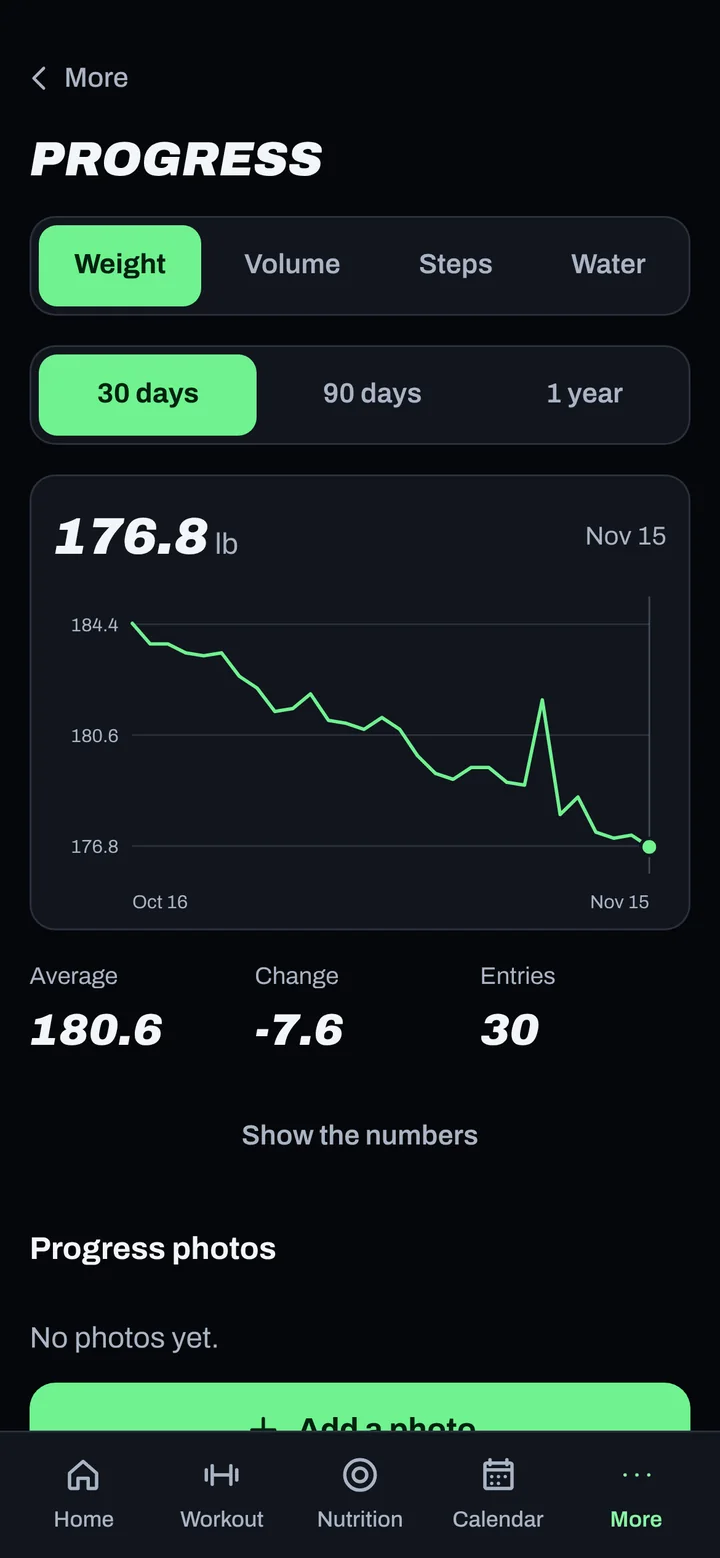
Progress photos

Steps

  1. Go to More > Charts and photos.
  2. The first time, read the note and tap Agree and turn on photos.
  3. Add photos here, or in the photo slots of your weekly check-in.
  4. Use the same slots each week: front, back, side left, side right.

Good to know

  • Same light, same place, same time of day, same poses. Morning, before food, works best.
  • Only you and your coaching team can see your photos.
  • Photos are resized before upload so they travel fast on gym signal. You still see a clear copy.
  • Photo storage is part of your health data. See How we protect your data.

Not working?

What you see What to do
I can't see Charts and photos You'll see Charts only if photos aren't in your plan.
Upload stuck Check your signal. Photos wait on your phone and send when you're back online.
Photos look sideways Retake with the phone held upright and auto-rotate on.

Related

Still stuck? Message your coach or email support@adaptnow.app.

Still stuck? Message your coach in the app, or email support@adaptnow.app.