Who it's for: Android users on the App, Group, Lifestyle and Elite plans. Wearable connections are rolling out in beta.
Steps
- Install the ADAPT NOW Sync app on your Android phone.
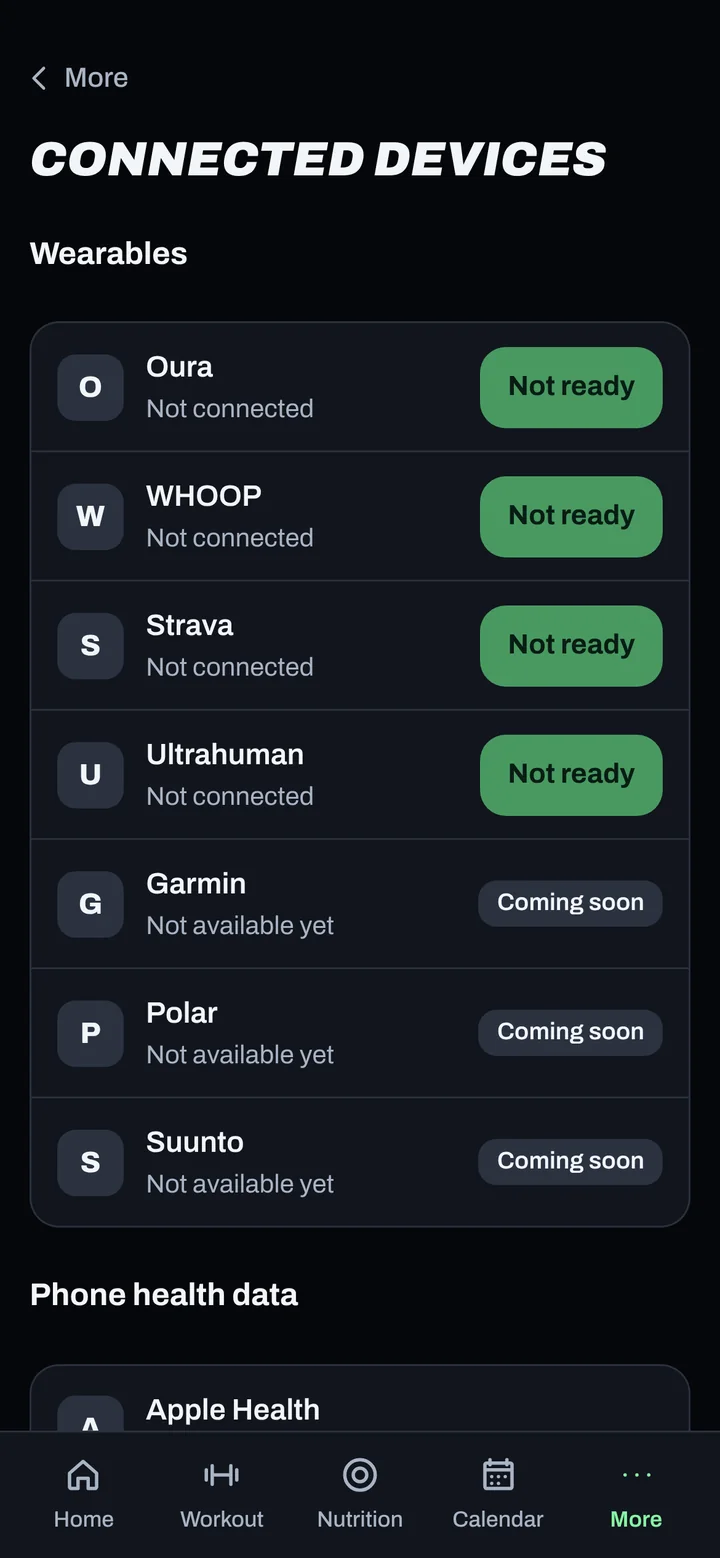
- In ADAPT NOW, go to More > Connected devices.
- Under Phone health data, tap Pair ADAPT NOW Sync.
- Enter the code in ADAPT NOW Sync. It works once, for 10 minutes.
- Allow Health Connect access when asked.
Good to know
- Only daily totals are sent: steps, sleep, heart rate, workouts and weight.
- Oura, WHOOP, Strava and Ultrahuman connect under Wearables on the same screen. Garmin, Polar and Suunto are coming.
- To stop, tap Remove. Disconnecting deletes the data it sent.
Not working?
| What you see | What to do |
|---|---|
| The code expired | Tap Pair ADAPT NOW Sync again. |
| No data after pairing | Open Health Connect and check ADAPT NOW Sync has permission to read your data. |
| Health Connect isn't on my phone | Install it from the Play Store (older Android versions). |
Related
Still stuck? Message your coach or email support@adaptnow.app.
Still stuck? Message your coach in the app, or email support@adaptnow.app.